New for 2027: Allplan, Allplan Civil & SDS2
 

Comprehensive solutions for every engineering workflow

Discover the 2027 versions of Allplan, Allplan Civil and SDS2. Whatever the workflow, we've got engineers covered. AI tools that keep the power in your hands, modern tools for structural analysis, faster drawing and details, and powerful parametric models for infrastructure.

Get a demo Buy now

See what's new in 2027 

Included in: #All Editions

Allplan Max. AI for engineers.

Customize ALLPLAN around the way your team really works

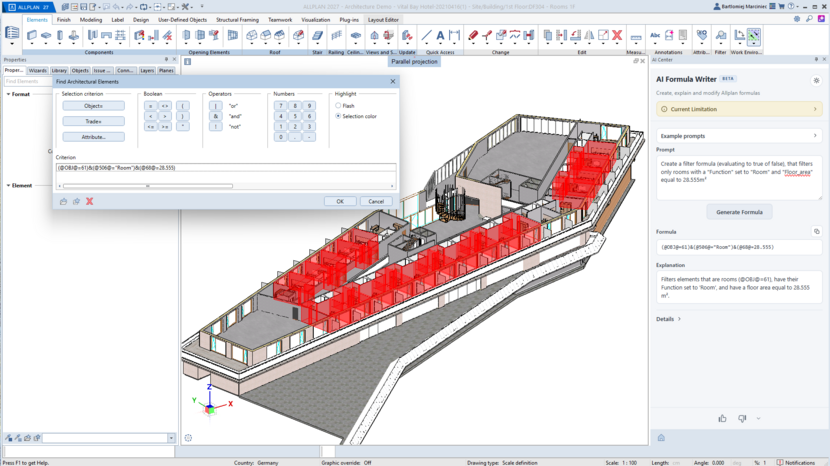
Allplan Max is AI that puts firms in control of their own workflows. Instead of forcing teams to adapt to the software, Allplan Max gives you the freedom to adapt the software to the way your teams design, analyze, and deliver. Customize ALLPLAN to your unique way of working, build your own product features, automate the repetitive tasks that slow projects down, and get expert guidance whenever you need it.

Request Demo

Included in: #Professional | Ultimate | Precast | Civil

Faster rebar

Automate more of the reinforcement detailing workflow

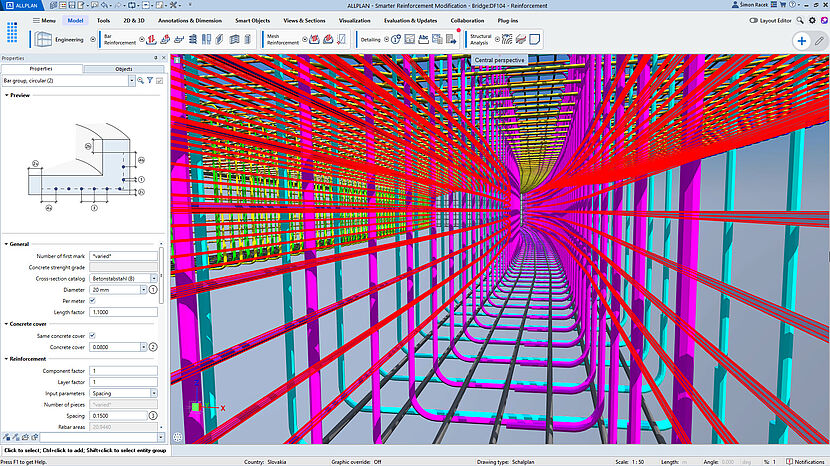
ALLPLAN 2027 improves rebar productivity with new modification palettes, better default attributes, modernized beam and wall reinforcement, automated label placement and grouped clash handling. Engineers finish drawings faster, spend less time on low-value cleanup and reduce the risk of detailing errors. Firms protect margins by using skilled engineering time on higher-value work.

Request Demo

Included in: #All Editions

New collaboration tools

Turn BIM information into usable project insight

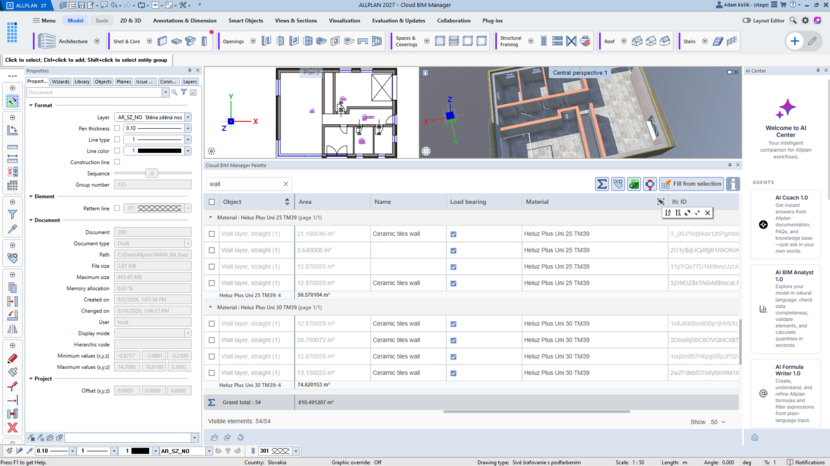
ALLPLAN 2027 improves how teams inspect, manage, calculate, visualize and document BIM information through Mark Numbering 2.0, Cloud BIM Manager, Dynamic Evaluation, calculation rules, and documentation controls. Teams save time preparing documentation, reduce rework from inconsistent information and make bids, quantities and approvals more dependable.

Request Demo

Further Improvements

Unifies creation and modification of door and window openings in a consistent Property Palette, replacing legacy dialogs. It supports favorites, full geometric control, and creation tasks up to twice as fast.

Automates mark numbering by scanning, grouping, and numbering building and precast elements with shared properties. It supports tolerances, prefixes, suffixes, conflict-free IDs, reusable schemas, and renumbering after changes.

Introduces Cloud BIM Manager (Information Palette 2.0) for centralized inspection, filtering, and editing of BIM data and quantities. Its modern data layer improves QTO and BIM handling across cloud and desktop solutions.

Extends tooltips to show selected BIM attributes, including object name, material, and custom properties, alongside CAD data. Configurable lists and responsive performance reduce palette use and improve data quality.

Introduces International Quantity Rules and TRADE management for transparent, configurable area, volume, and quantity calculations. A rule editor, managed catalogs, and regional templates align QTO with local standards.

Enables IFC export in TeamWork scenarios while teams continue working and improves IFC import safety. This reduces collaboration bottlenecks and improves productivity in multi-user environments.

Displays IFC external references directly in views and sections, including derivations, layouts, print, and export, without full import. This improves openBIM coordination and supports reinforcement detailing in context.

Improves IFC4 import quality with modern classification and georeferencing support. It reduces cleanup and coordination cycles and strengthens competitiveness for openBIM tenders; official buildingSMART certification remains pending review.

Brings key georeferencing information into one Property Palette for clear control of the base point, survey point, and ALLPLAN origin. It improves IFC and DWG/DGN/DXF workflows, data precision, and georeferenced PDF export.

Introduces automatic text leaders for associative labels in views and sections. Leaders remain connected as geometry changes and can point to the centroid, nearest point, or a custom location, reducing manual recreation work.

Adds per-element Graphic Overrides to layouts, with distinct combinations assigned, previewed, and output through the Property Palette. It improves presentation control without duplicating drawings or changing global model views.

Introduces dynamic, view-dependent contours and snapping for complex curved general 3D objects across standard viewports. It extends support to merged and edited B-Rep shapes for more accurate modeling, detailing, and dimensioning.

Adds control over how SmartSymbols, PythonParts, and SmartParts appear in horizontal views and sections. This supports clearer, standards-aligned documentation with less manual drawing rework.

Introduces Toolscape as a customizable, unified ALLPLAN workspace with dockable toolkits, ordered favorites, global search, and workflow-based structure. ALLPLAN 2027 adds it as a configuration option focused on Toolboard.

Allows opening layers to be viewed and edited directly in both the Object Palette and the Information Palette (Cloud BIM Manager).

Makes the attributes Reference ID and Reference Name available as calculated attributes.

Automatically populates a new bSDD URI attribute to store the class URI value.

Adds 13 reinforcement modification palettes and attribute-driven placement for bars, groups, meshes, and labels. It reduces repetitive work and supplies BIM information for filtering, analysis, coordination, reporting, and export.

Modernizes automated beam reinforcement with better support recognition, anchorage, overlap handling, and bar and stirrup options. It also accepts 3D bodies for automated wall reinforcement and more flexible detailing.

Automates rebar label placement to reduce manual annotation work, improve labeling workflows, and save time in drawing preparation.

Groups reinforcement clashes to make complex models easier to understand, helping users maintain a clear overview and make informed adjustments.

Introduces integrated tools to simulate construction phases in a coordinated workflow, improving representation of build sequences, planning reliability, and management of complex site conditions within one model.

Adds an integrated soil-layer workflow following the ALLPLAN and DC-Software merger. Users can turn borehole input into calculated soil layers within ALLPLAN, without changing applications or maintaining DC-Integra locally.

Places and adjusts repetitive civil elements along reference lines and axes using a few parameters. It stores inputs for later edits, supports number- and spacing-based distribution, and updates stationing without recreating objects.

Combines two digital terrain models more efficiently while preserving important detail, saving preparation time and improving the foundation for downstream design.

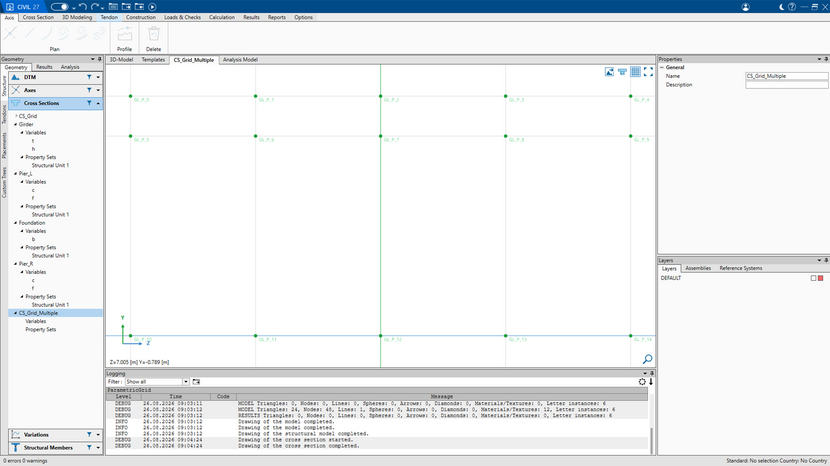
Provides a fully associative, real-time cross-section modeling environment so designers can immediately see and control parameter changes. It creates a faster, more intuitive, BIM-compliant workflow with less rework.

Adds automated vertical signalization with geometry-aware placement and orientation, improving road-sign design accuracy and reducing manual adjustments when alignments change.

Gives customers more control when updating custom scripted objects, reducing unwanted model changes and helping projects remain stable over time.

Adds event-based Python API triggers that automate actions at key ALLPLAN and project moments, reducing manual effort and enabling automatic quality checks and background workflows.

Allows PythonPart context menus to be customized so relevant actions are easier and faster to access when working with custom objects.

Enables print-layout automation through the Python API, including layout handling and generation tasks. It saves time on repetitive documentation and supports efficient delivery of large drawing packages.

Included in: #Civil

Automatic Parametric Axis Grid

Change once. Automatic updates everywhere

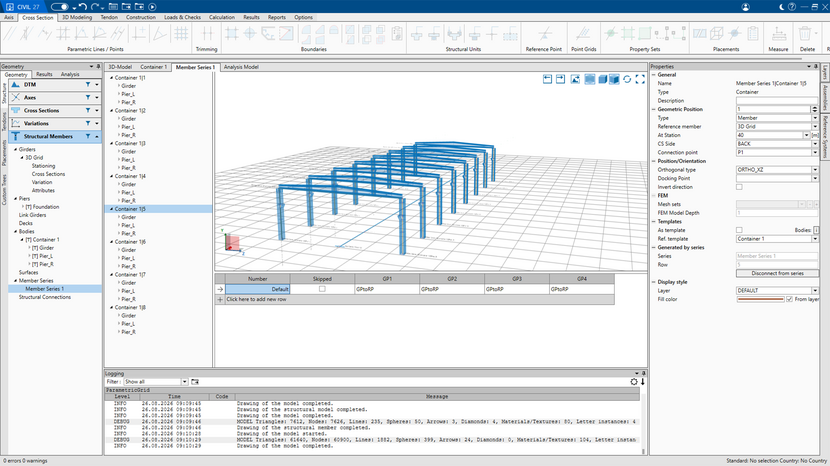
Automated 2D parametric axis grids are defined in the cross-section window, extruded along the axis at stationing intervals the user sets and can change at any time. Elements snap to exact, consistent positions, cutting modeling time from hours to minutes, and a single change of spacing updates the entire structure instantly.

Included in: #Civil

Flexible Distribution and Stationing

No more manual recalculation

Distribute elements by spacing or number using familiar stations, offsets and alignment values. Start modeling immediately, without manual calculations or time-consuming data preparation. Input is entered in the same terms engineers already work in, stations, offsets, alignment values, so there's no manual calculation before modeling can start. The time saved goes into the design and not into the data prep.

Included in: #Civil

Reusable Serial Elements

Turn hours of repetitive detailing into minutes of smart modeling

Create a complex truss bay, gallery field or station-roof module once, then distribute it as an intelligent serial element. The serial element is a container with an arbitrary number of insertion points, so a truss bay or hall field can be modeled once in its own window and arrayed across the grid. Structures that would take hours of repetitive input are modeled in minutes using this "template-like" parametric definition. The detail work happens once, not multiple times.

Included in: #All Editions

AI Center

Learn faster with AI Coach, dive deeper with AI Structural Analyst

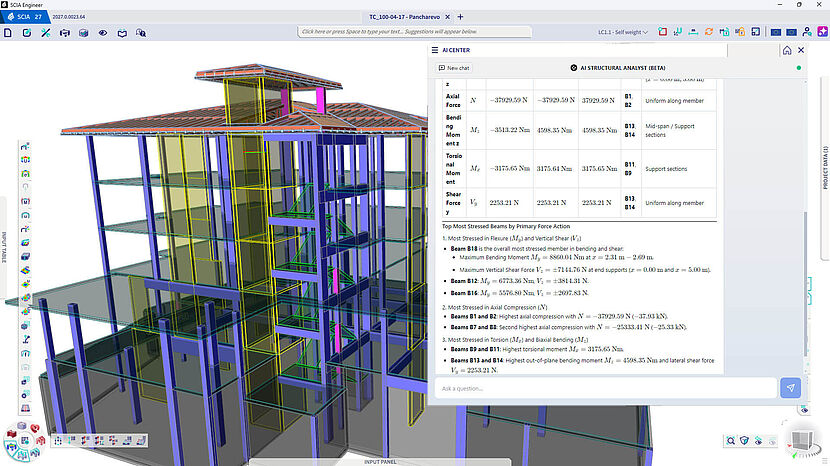
SCIA Engineer's AI Coach and AI Structural Analyst bring intelligent support directly into your workflow. AI Coach delivers in-context guidance that shortens onboarding for junior and occasional users, answering questions instantly and reducing reliance on support tickets or formal training. AI Structural Analyst automatically interprets raw internal forces, reactions, and deformations, flagging peaks, sign changes, and critical sections so engineers can spot what matters and reach reliable decisions faster. Together, they minimize the risk of overlooking critical values, cut evaluation time, and address the industry's growing skills gap — all without leaving the design environment. The result: less time spent training, waiting, or double-checking, and more time spent engineering with confidence.

Included in: #SCIA Ultimate

Time-dependent analysis

Accurate modeling of long-term effects in concrete

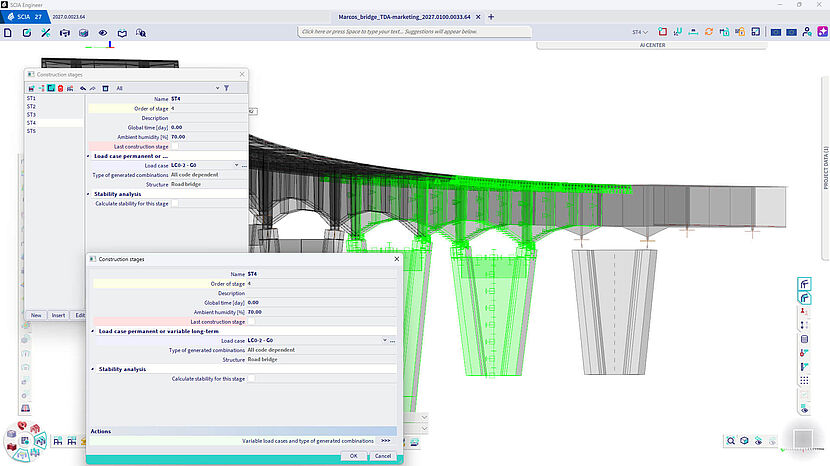
Time-Dependent Analysis lets engineers accurately capture creep, shrinkage, concrete aging, and prestress relaxation directly within SCIA Engineer, so long-term deflections, force redistribution, and crack risk reflect real structural behavior instead of short-term approximations. By correctly modeling force redistribution across construction stages — staged casting, composite action, post-tensioning — engineers get results that genuinely matter for bridges, transfer structures, and long-span or slender designs. There's no need to export data to third-party bridge tools, eliminating handoff errors and saving time. The result is a safer, more economical design that avoids oversized structures based on rough approximations, all while satisfying both short-term and long-term serviceability requirements in one workflow.


Included in: #SCIA Concept | SCIA Professional | SCIA Ultimate

Load takedown

Load path verification from roof to foundation

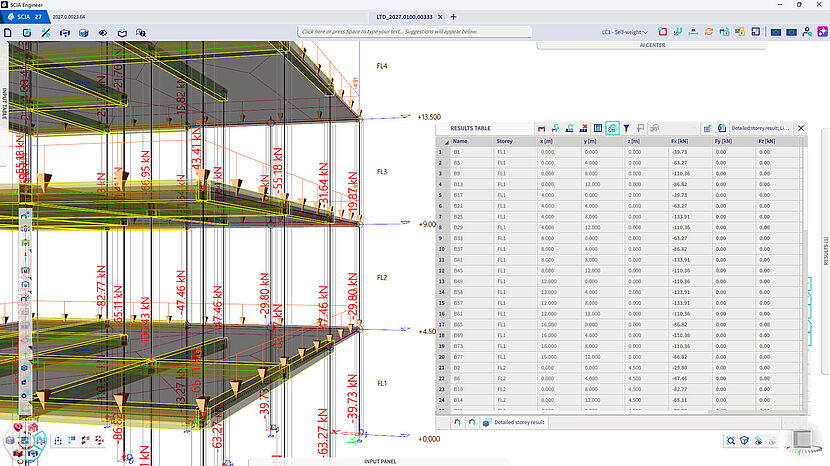
Load Takedown Analysis automatically traces how gravity loads from roofs, floors, and walls travel down through the structure to its foundations, replacing error-prone spreadsheets with a fast, built-in solution. Engineers get clean, accumulated vertical loads per support and per level, giving accurate data for column, wall, and foundation design without manually tracing load paths. It also serves as an independent reasonability check on FEM reactions, catching modeling errors before they reach the foundation stage. Available early in the project, it helps size foundations and spot problem areas before detailed results are ready, saving time and ensuring a faster, cleaner handoff to foundation and geotechnical specialists.

Further Improvements

Sub-combinations give engineers greater flexibility to build custom load combinations for special cases where standard code-defined combinations fall short. This saves time when setting up load combinations across a project, while streamlining the workflow to eliminate manual errors.

SCIA Engineer now supports 1D checks for concrete under the 2nd generation of Eurocode EN 1992-1-1, giving engineers early access to the most significant update to Europeans. This proactive approach lets firms validate workflows, adjust verification methods gradually, and build confidence with the new provisions within a familiar tool.

Building on the 2nd generation Eurocode steel design already introduced in version 2026, this extension adds fire-resistance checks under EN 1993-1-2, including support for hot-dip galvanized steel — addressing a growing market need. Engineers can now perform both serviceability, durability, and fire resistance verifications within a single integrated workflow.

Included in: #All Editions

Allplan Max

AI tools for easier access to model intelligence

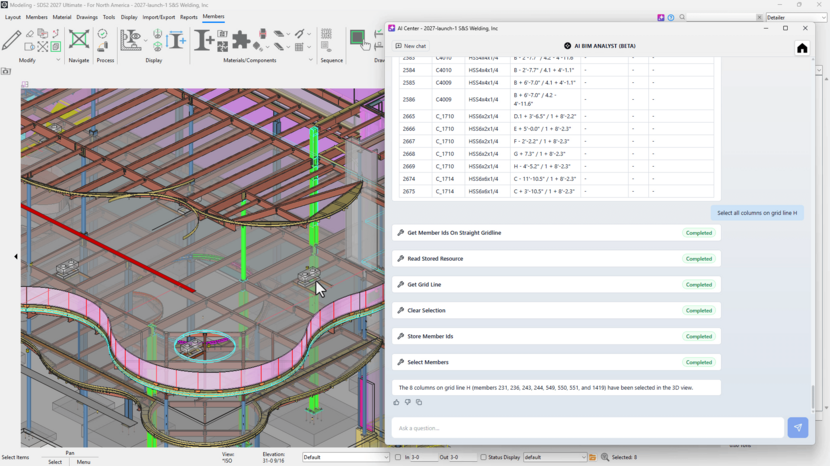
Get answers from your model and support with SDS2 at the moment you need them. Ask questions to explore project information, create reports, and keep work moving without interruption. The AI BIM Analyst allows users to use natural-language prompts to query model data, select objects, and generate complex reports.Access and report on project information up to 5× faster, helping your team work more productively. The AI Drafter intelligently places erection-drawing labels without overlaps. The AI Coach provides chat-based answers from SDS2 Help documentation directly inside the software.

Included in: #Drafting | Ultimate

Model Synced Erection Drawings

Faster Drawing Workflows

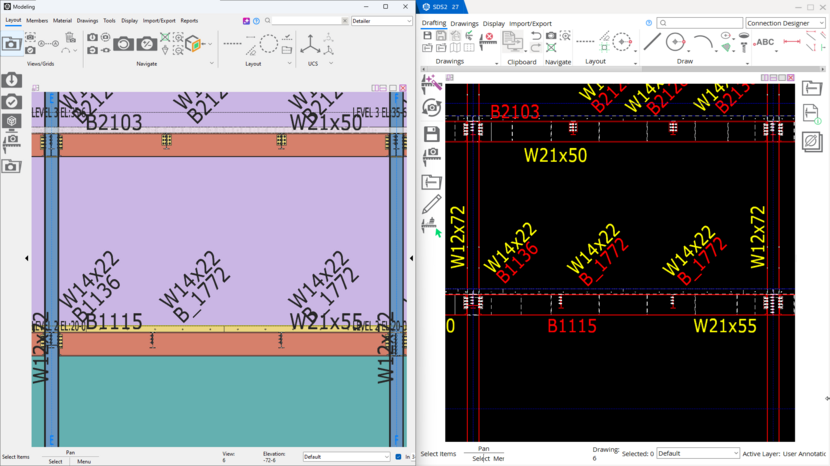
Keep erection drawings aligned with model changes without requiring regeneration. Save an estimated 20–50% of drawing-cleanup time while preserving completed drawing work. Reduce cleanup and avoid lost work when model changes occur. Keep drawings aligned with the model while giving detailers more control over presentation, member labels, and clipped areas. Model Synced Erection Drawings keep drawings aligned to model changes without regeneration. Clip Area Enhancements add control and preserve work when redetailing.

Included in: #All Editions

Advanced Connection Group Reporting

More efficient model workflows

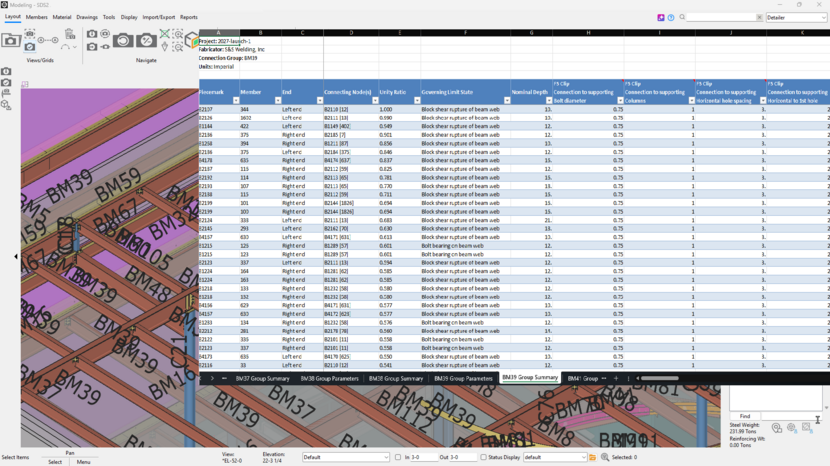
Bring more automation and control to modeling, connection design, and review. Handle more design and modeling work in the software, bring related connections together for review, and prepare model data for downstream work with less effort. Detailed Excel reports make it easier to review connection design packages efficiently, saving time and helping reduce project costs. Direct Welded Connection Design automates welded connections using code standards. Advanced Connection Group Reporting creates clear approval packages. Handrail, IFC Export, and Connection Plate Enhancements reduce manual modeling and data preparation.


ALLPLAN

DESIGN TO BUILD A BETTER TOMORROW
More productive, collaborative and advanced workflows

Try ALLPLAN for free

  • Interdisciplinary AEC teamwork on a single platform
  • Superior coordination of materials and construction methods
  • Advanced BIM workflows and real-time collaboration

Schedule a demo today and learn how you can accelerate production with ALLPLAN’s unique 2D-to-3D workflow and maintain information integrity from design through construction.

Free Demo